Conditional Access Framework (2025.2.3)

Today I’ve released a new version of my Conditional Access Framework. Version 2025.2.3 has one modified and one new policy which are meant for internals.
Thanks to Jan Bakker i got aware of a misconfiguration in policy CA201. Combining UserRisk and SigninRisk into a single policy can lead to issues. His blog describes the issue in detail. We have now modified policy CA201 (User risk only) and added policy CA210 (SignIn risk only).
Note: The complete framework, with downloadable policies and instructions on how to import these can be found in my Github.
Table of Contents
- Changelog
- Persona’s
- Conditional Access policies
- CA000-Global-IdentityProtection-AnyApp-AnyPlatform-MFA
- CA001-Global-AttackSurfaceReduction-AnyApp-AnyPlatform-BLOCK-CountryWhitelist
- CA002-Global-IdentityProtection-AnyApp-AnyPlatform-Block-LegacyAuthentication
- CA003-Global-BaseProtection-RegisterOrJoin-AnyPlatform-MFA
- CA004-Global-IdentityProtection-AnyApp-AnyPlatform-AuthenticationFlows
- CA005-Global-DataProtection-Office365-AnyPlatform-Unmanaged-AppEnforcedRestrictions-BlockDownload
- CA006-Global-DataProtection-Office365-iOSenAndroid-RequireAppProtection
- CA100-Admins-IdentityProtection-AdminPortals-AnyPlatform-MFA
- CA101-Admins-IdentityProtection-AnyApp-AnyPlatform-MFA
- CA102-Admins-IdentityProtection-AllApps-AnyPlatform-SigninFrequency
- CA103-Admins-IdentityProtection-AllApps-AnyPlatform-PersistentBrowser
- CA104-Admins-IdentityProtection-AllApps-AnyPlatform-ContinuousAccessEvaluation
- CA105-Admins-IdentityProtection-AnyApp-AnyPlatform-PhishingResistantMFA
- CA200-Internals-IdentityProtection-AnyApp-AnyPlatform-MFA
- CA201-Internals-IdentityProtection-AnyApp-AnyPlatform-BLOCK-HighRiskUser
- CA202-Internals-IdentityProtection-AllApps-WindowsMacOS-SigninFrequency-UnmanagedDevices
- CA203-Internals-AppProtection-MicrosoftIntuneEnrollment-AnyPlatform-MFA
- CA204-Internals-AttackSurfaceReduction-AllApps-AnyPlatform-BlockUnknownPlatforms
- CA205-Internals-BaseProtection-AnyApp-Windows-CompliantorAADHJ
- CA206-Internals-IdentityProtection-AllApps-AnyPlatform-PersistentBrowser
- CA207-Internals-AttackSurfaceReduction-SelectedApps-AnyPlatform-BLOCK
- CA208-Internals-BaseProtection-AnyApp-MacOS-Compliant
- CA209-Internals-IdentityProtection-AllApps-AnyPlatform-ContinuousAccessEvaluation
- CA210-Internals-IdentityProtection-AnyApp-AnyPlatform-BLOCK-HighRiskSignIn
- CA400-GuestUsers-IdentityProtection-AnyApp-AnyPlatform-MFA
- CA401-GuestUsers-AttackSurfaceReduction-AllApps-AnyPlatform-BlockNonGuestAppAccess
- CA402-GuestUsers-IdentityProtection-AllApps-AnyPlatform-SigninFrequency
- CA403-Guests-IdentityProtection-AllApps-AnyPlatform-PersistentBrowser
- CA404-Guests-AttackSurfaceReduction-SelectedApps-AnyPlatform-BLOCK
- Considerations
- Troubleshooting
- Resources
Changelog
- CA201: Policy contained Signin risk and User risk in a single policy. Now separated into CA201 and CA210
- CA210: Separated (new) policy for Signin risk
Persona’s
Global
Global is a persona/placeholder for policies that are general in nature or do not only apply to one persona. So it is used to define policies that apply to all personas or don’t apply to one specific persona. The reason for having this persona is to be able to have a model where we can protect all relevant scenarios. It should be used to hold policies that apply to all users or policies that enforce protection on scenarios not covered by policies for other personas
Admins
We define admins in this context as any non-guest identity (cloud or synced) that have any Azure AD or other Microsoft 365 admin Role (like in MDCA, Exchange, Defender for Endpoints or Compliance). As guests who have such roles are covered in a separate persona, guests are excluded from this persona.
Internals
Internals cover all users who have an AD account synced to Azure AD who are employees of the company and work in a standard end-user role.
Guests
Guests holds all users who have an Azure AD guest account that has been invited into the customer tenant
Conditional Access policies
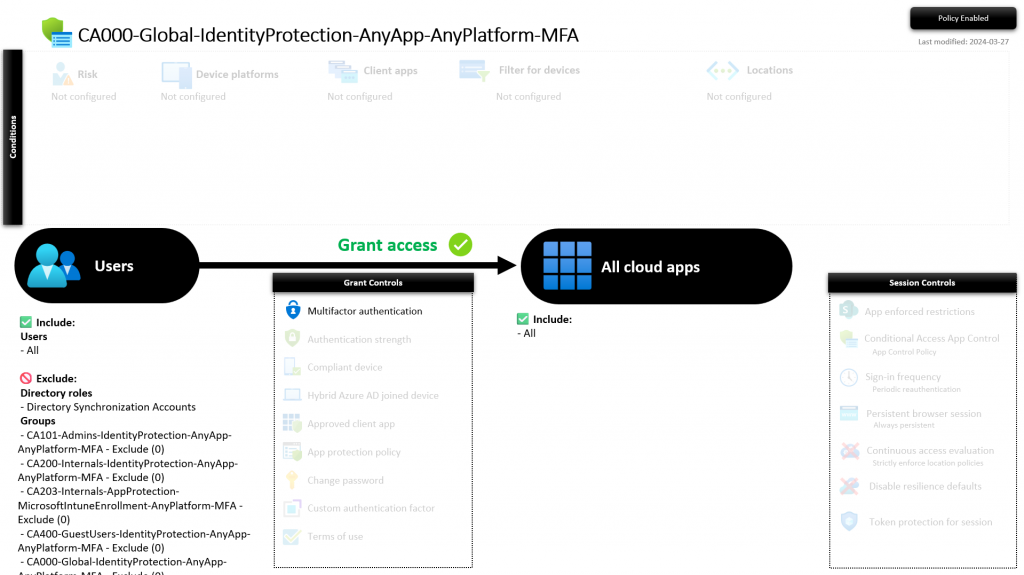
CA000-Global-IdentityProtection-AnyApp-AnyPlatform-MFA
This policy requires MFA for all cloud apps, from every platform. It captures all authentications in scope not captured by other MFA policies.
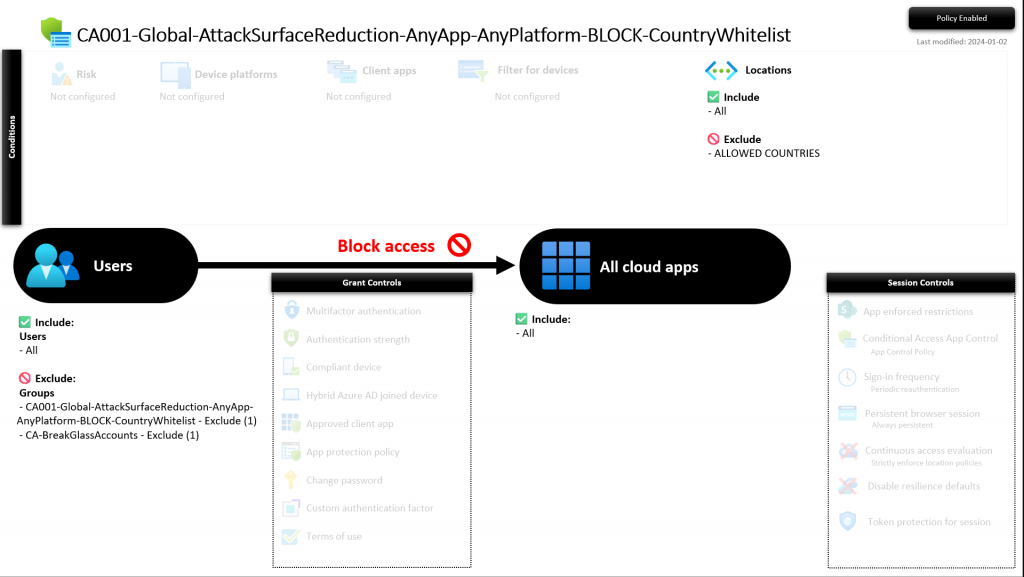
CA001-Global-AttackSurfaceReduction-AnyApp-AnyPlatform-BLOCK-CountryWhitelist
This policy blocks all countries, to all cloud apps, from every platform except for the countries configured in the named location ALLOWED COUNTRIES. This named location is excluded in this policy.
Important: Modify the named location with your approved countries. By default only Belgium, Luxembourgh and Netherlands are allowed to have access from.
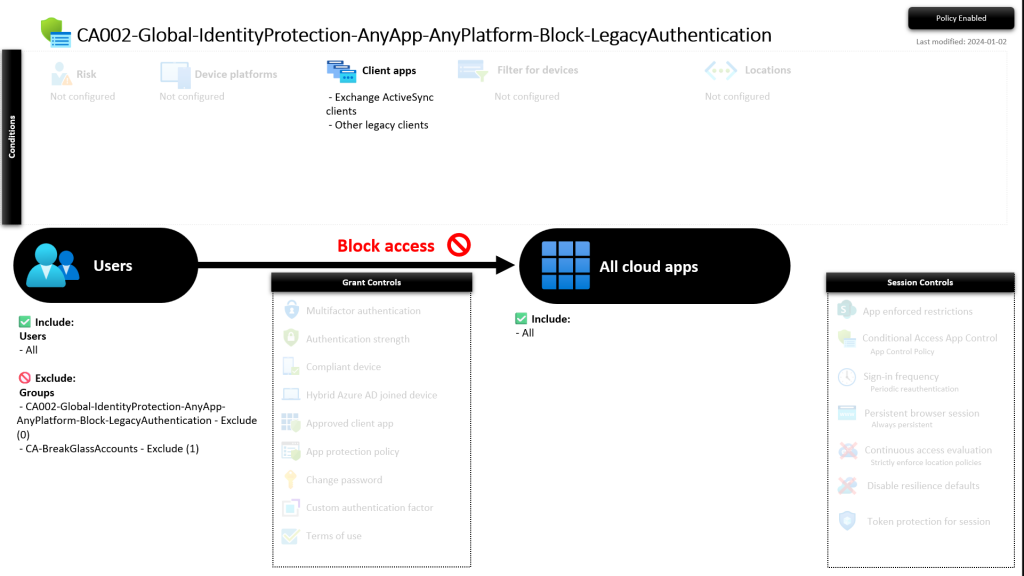
CA002-Global-IdentityProtection-AnyApp-AnyPlatform-Block-LegacyAuthentication
This policy blocks legacy authentication for all users, to all cloud apps, from any platform.
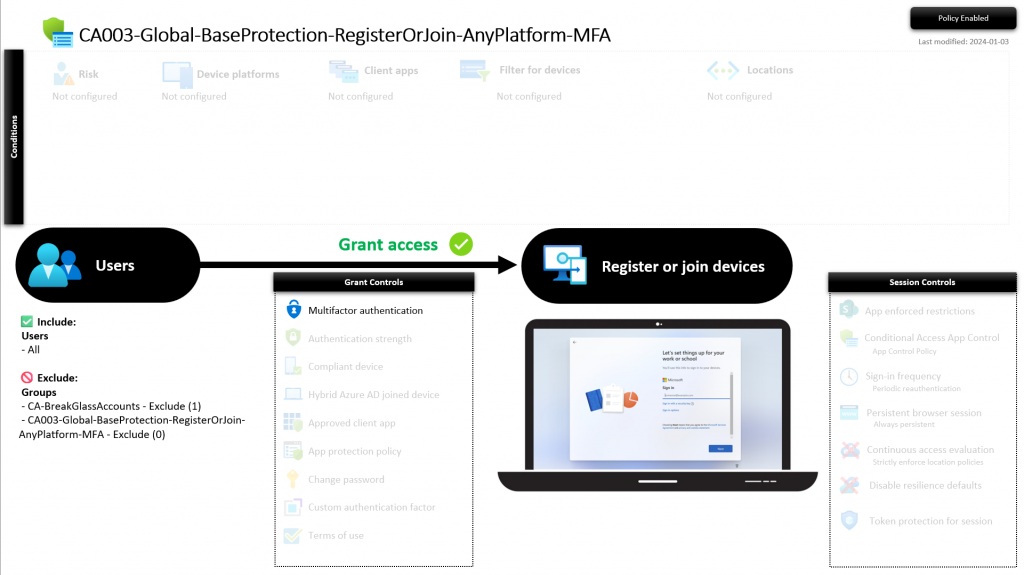
CA003-Global-BaseProtection-RegisterOrJoin-AnyPlatform-MFA
This policy requires MFA for all users, to register or join a device to your tenant/environment.
Tip: Make sure to disable Require Multifactor Authentication to register or join devices with Microsoft Entra. This can be found under https://portal.azure.com -> Entra ID -> Devices -> Device settings.
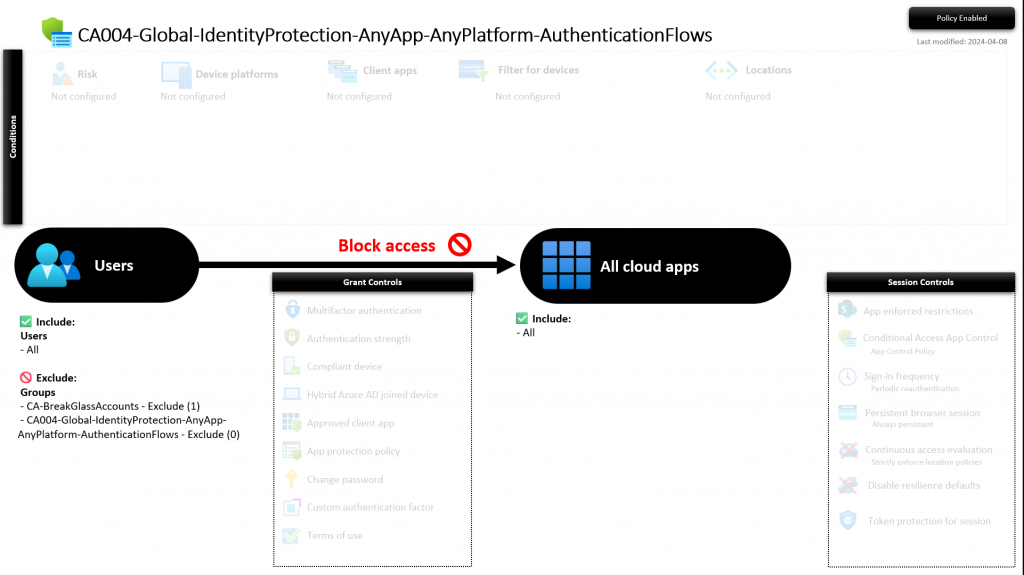
CA004-Global-IdentityProtection-AnyApp-AnyPlatform-AuthenticationFlows
This policy prevents all users from transfering authentication flows from PC to mobile for example. This feature is currently in preview.
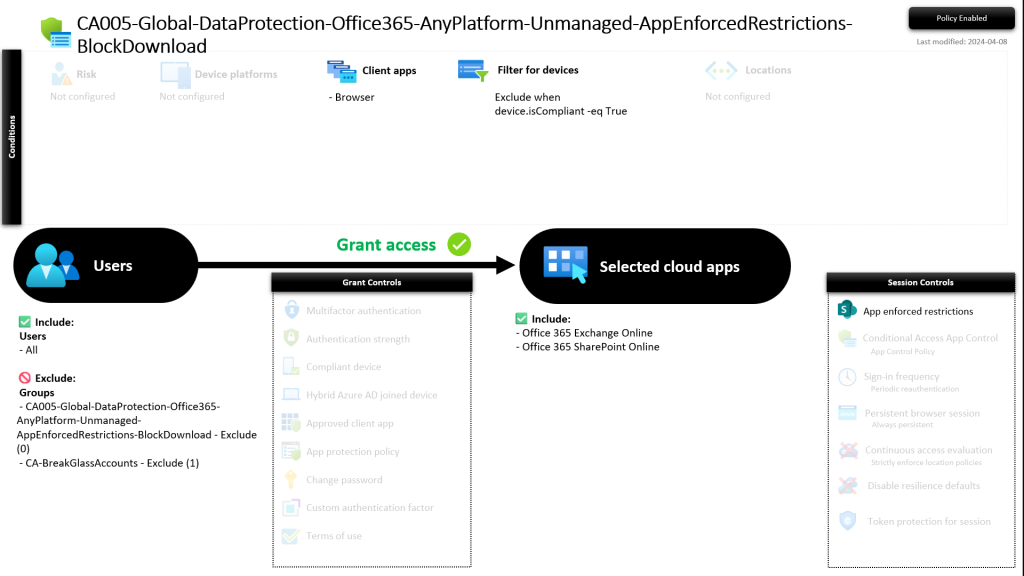
CA005-Global-DataProtection-Office365-AnyPlatform-Unmanaged-AppEnforcedRestrictions-BlockDownload
This policy prevents all users from downloading, printing or syncing Office 365 data from an unmanaged device. It requires App Enforce Restrictions.
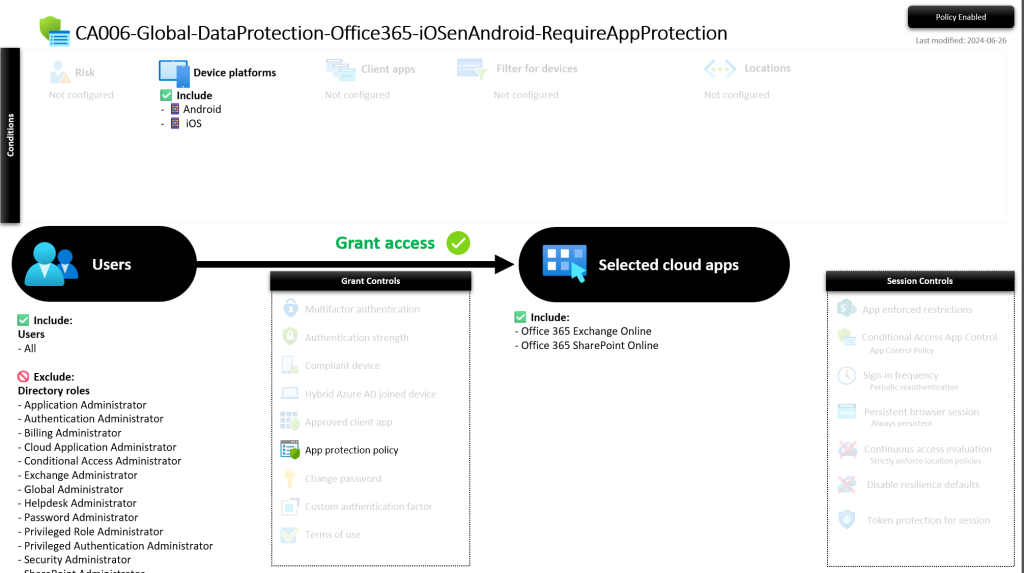
CA006-Global-DataProtection-Office365-iOSenAndroid-RequireAppProtection
This policy requires App Protection policies for all users when accessing Office 365 data from iOS or Android devices. Admin roles are excluded to make sure the Microsoft 365 App’s on the iOS and Android devices do work. This one is designed on the principle that admin roles are only assigned to admin accounts!
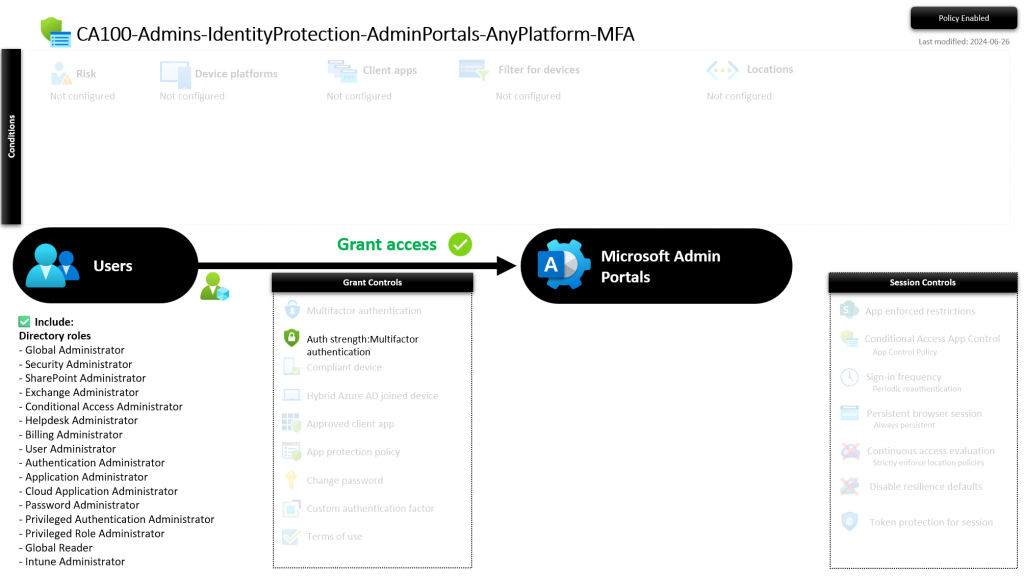
CA100-Admins-IdentityProtection-AdminPortals-AnyPlatform-MFA
This policy requires MFA for certain admin roles when they access the Admin Portals. This one is designed on the principle that admin roles are only assigned to admin accounts!
CA101-Admins-IdentityProtection-AnyApp-AnyPlatform-MFA
This policy requires MFA for certain admin roles when they access the any cloud app. This one is designed on the principle that admin roles are only assigned to admin accounts!
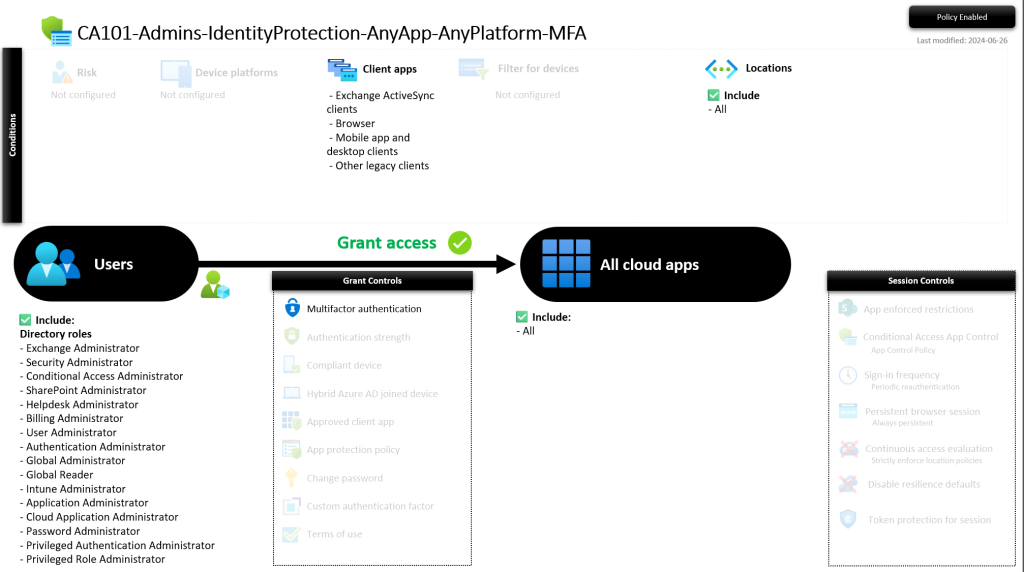
CA102-Admins-IdentityProtection-AllApps-AnyPlatform-SigninFrequency
This policy sets a Sign-in frequency for certain admin roles to a maximum of 12 hours. Admins need to re-authenticate of logon after 12 hours.
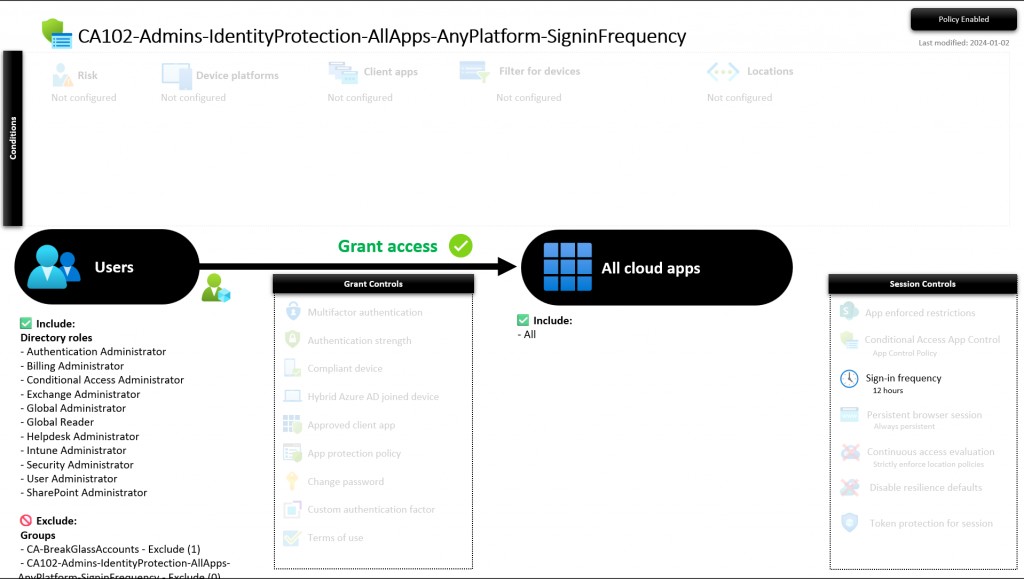
CA103-Admins-IdentityProtection-AllApps-AnyPlatform-PersistentBrowser
This policy prevents having persistent browser sessions for admins from every device.
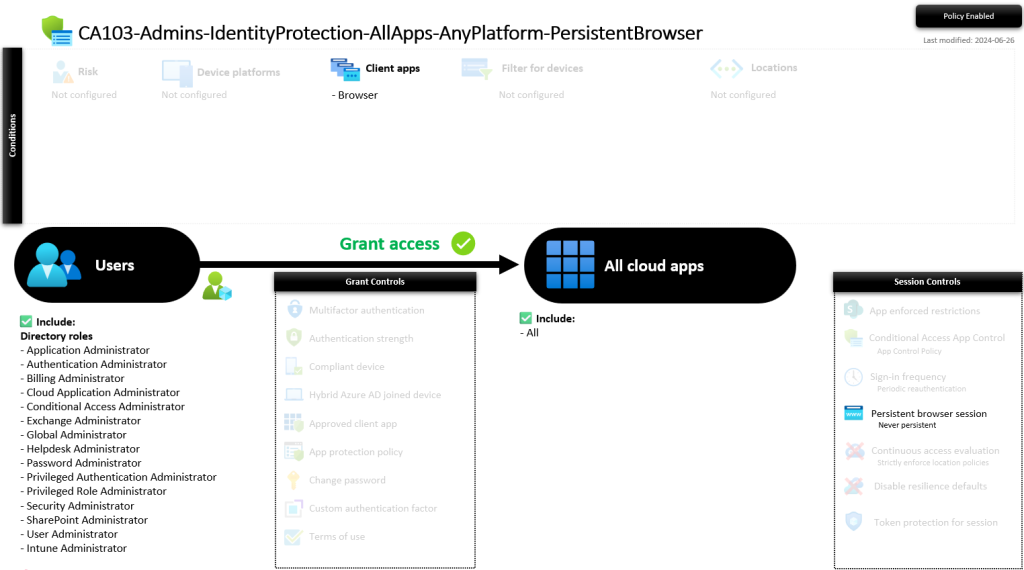
CA104-Admins-IdentityProtection-AllApps-AnyPlatform-ContinuousAccessEvaluation
This policy allows Microsoft Entra ID to re-evaluate a user’s access to resources in near real-time, rather than waiting for the typical token expiration time (which could be up to an hour). Read the Microsoft documentation here.
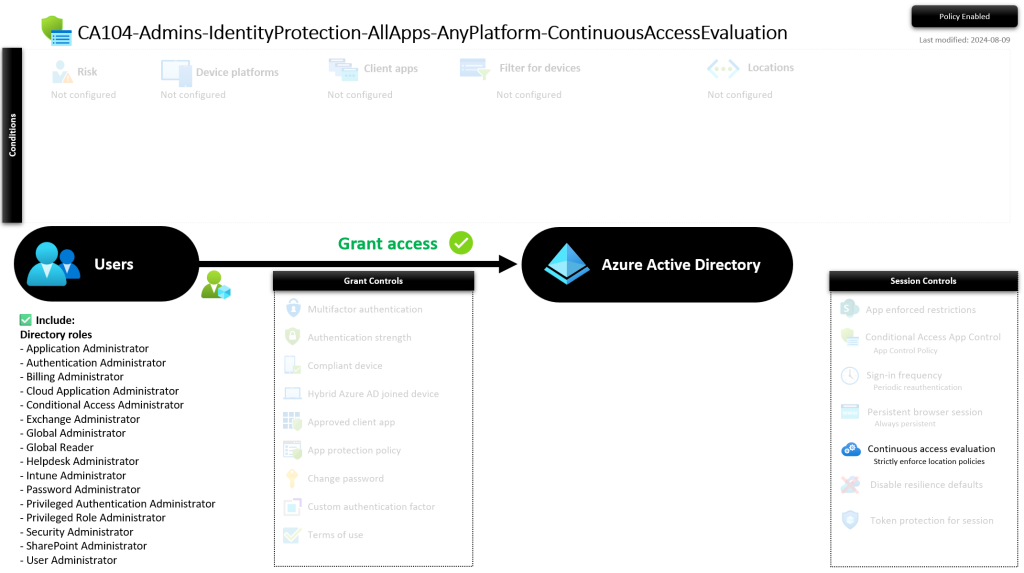
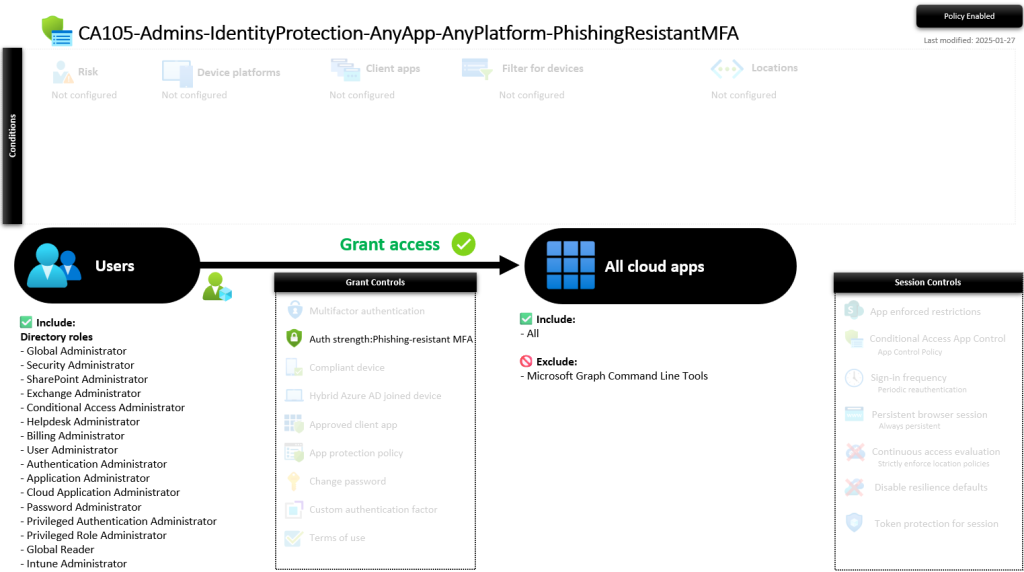
CA105-Admins-IdentityProtection-AnyApp-AnyPlatform-PhishingResistantMFA
This policy requires Phishing Resistant MFA for admins. It does exclude Microsoft Graph Command Line Tools (cause i needed it) but you are free to remove it from your policy. It’s slightly different from the Template policy. We also include Global Reader and Intune Administrators into the admin role selection.
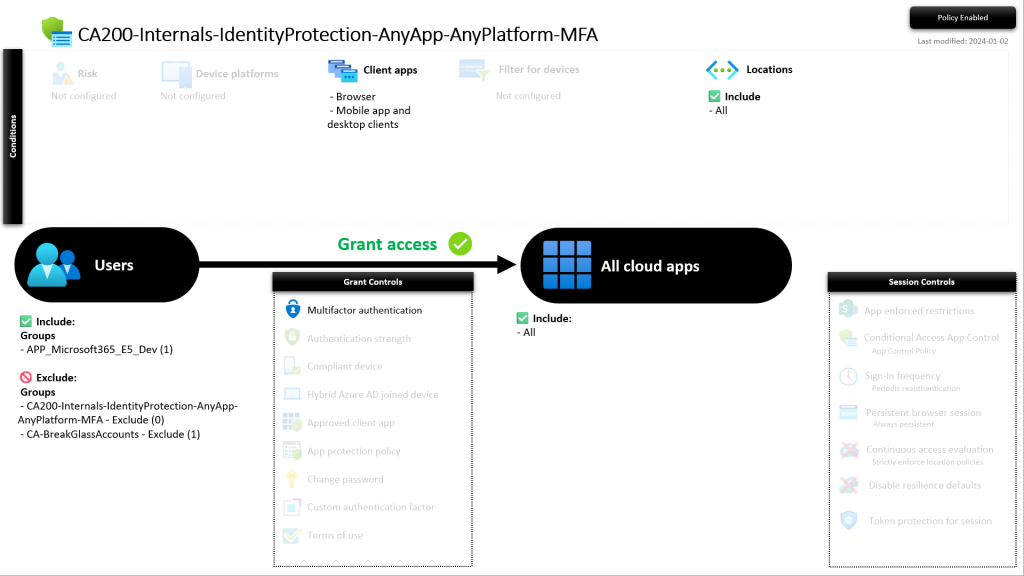
CA200-Internals-IdentityProtection-AnyApp-AnyPlatform-MFA
This policy requires MFA for all internal identities, for all cloud applications, from any platform.
Important: Verify the included group(s) and/or add your custom groups which have all internals in it. APP_Microsoft365_E5_DEV is added as an example.
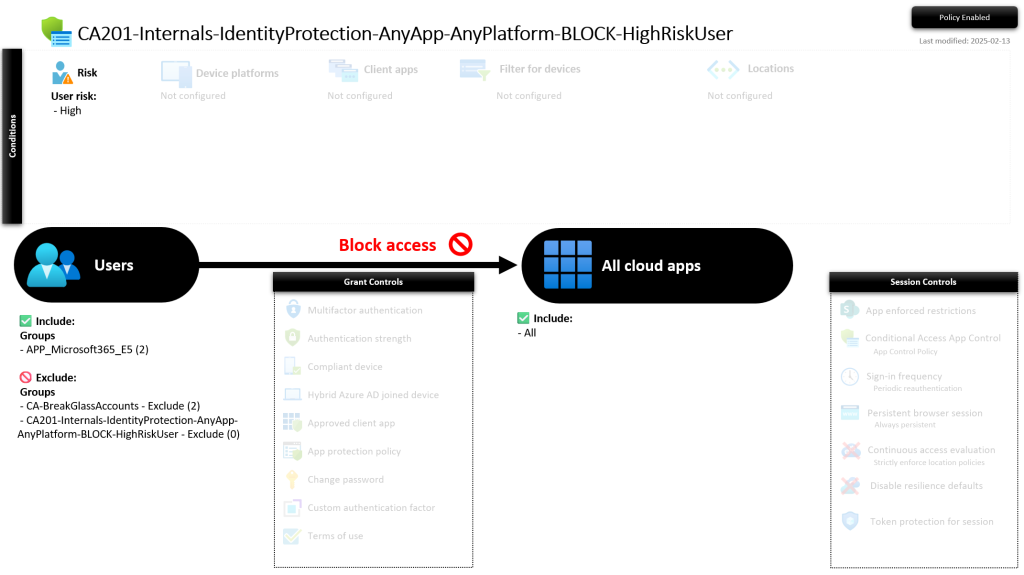
CA201-Internals-IdentityProtection-AnyApp-AnyPlatform-BLOCK-HighRiskUser
This policy blocks all internal users which have a high risk (user risk) status, to all cloud apps, from all platforms.
Important: Verify the included group(s) and/or add your custom groups which have all internals in it. APP_Microsoft365_E5_DEV is added as an example.
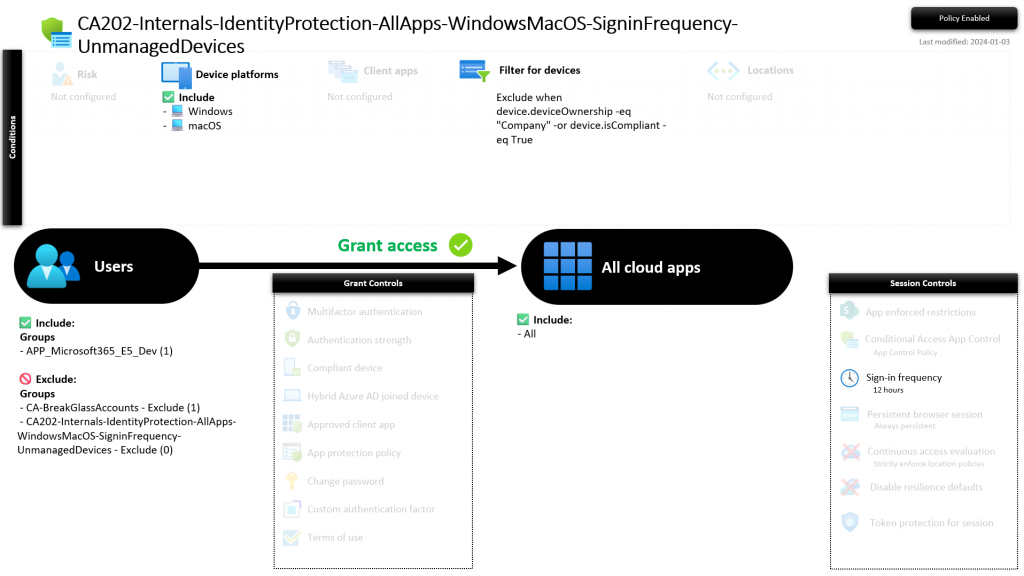
CA202-Internals-IdentityProtection-AllApps-WindowsMacOS-SigninFrequency-UnmanagedDevices
This policy sets a Sign-in frequency to a maximum of 12 hours for internals, to all cloud apps, using unmanaged Windows or MacOS devices.
Important: Verify the included group(s) and/or add your custom groups which have all internals in it. APP_Microsoft365_E5_DEV is added as an example.
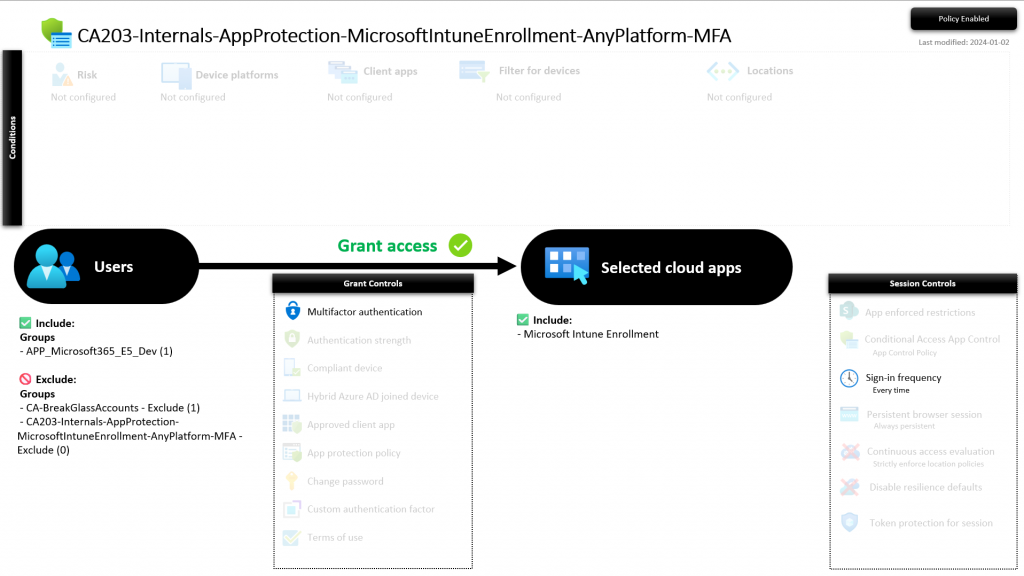
CA203-Internals-AppProtection-MicrosoftIntuneEnrollment-AnyPlatform-MFA
This policy requires MFA for internals when enrolling their devices in Intune.
Important: Verify the included group(s) and/or add your custom groups which have all internals in it. APP_Microsoft365_E5_DEV is added as an example.
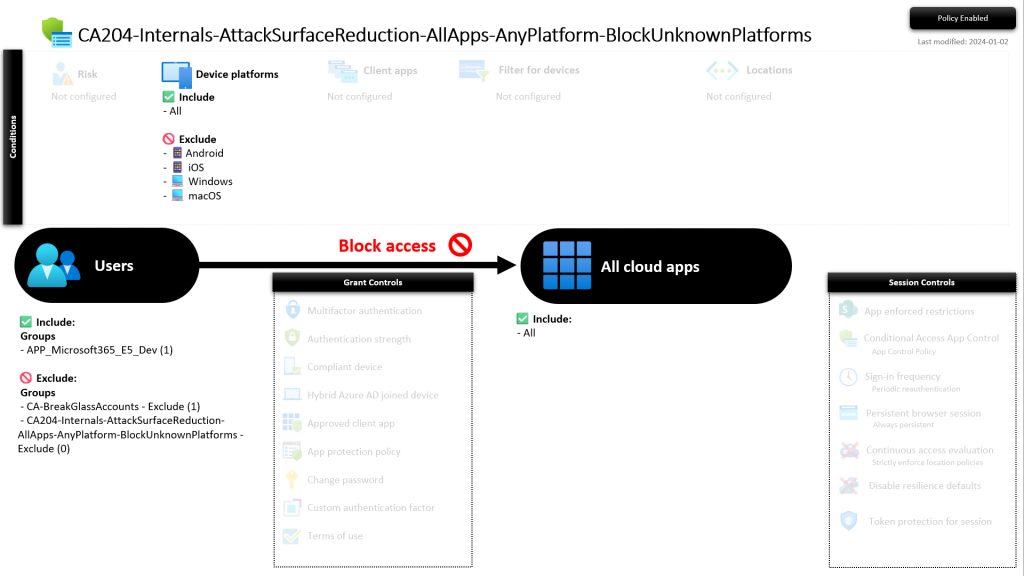
CA204-Internals-AttackSurfaceReduction-AllApps-AnyPlatform-BlockUnknownPlatforms
This policy blocks unknown/unsupported device platforms for internals.
Note: Currently only Windows, MacOS, Android and iOS are supported. If (for example) Linux or Windows Phone is allowed you need to modify the policy.
Important: Verify the included group(s) and/or add your custom groups which have all internals in it. APP_Microsoft365_E5_DEV is added as an example.
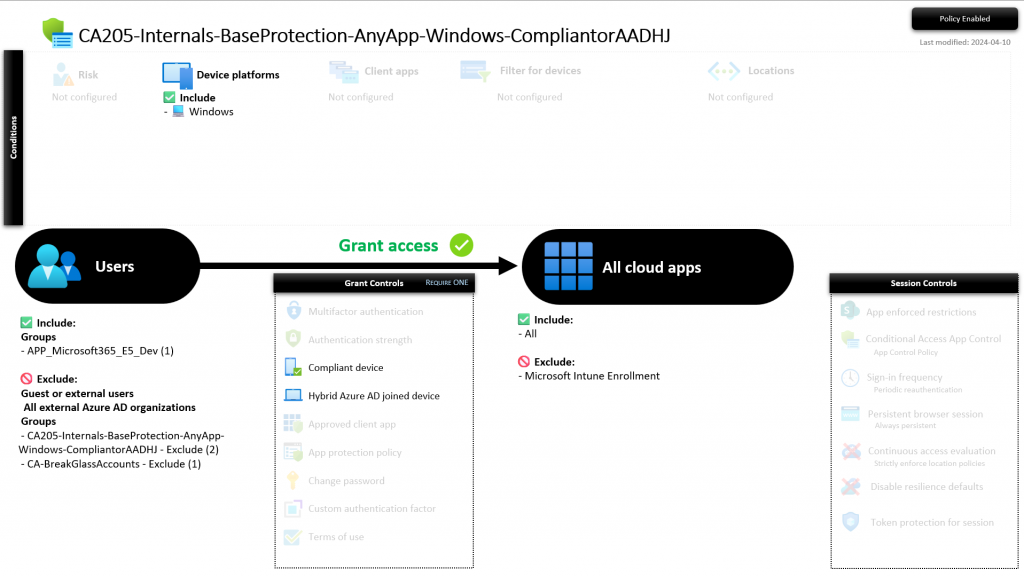
CA205-Internals-BaseProtection-AnyApp-Windows-CompliantorAADHJ
This policy requires internals to make use of a Windows device that is compliant or AADHJ (Azure AD Hybrid Joined / Entra ID Hybrid Joined) while accessing any cloud app.
Important: Verify the included group(s) and/or add your custom groups which have all internals in it. APP_Microsoft365_E5_DEV is added as an example.
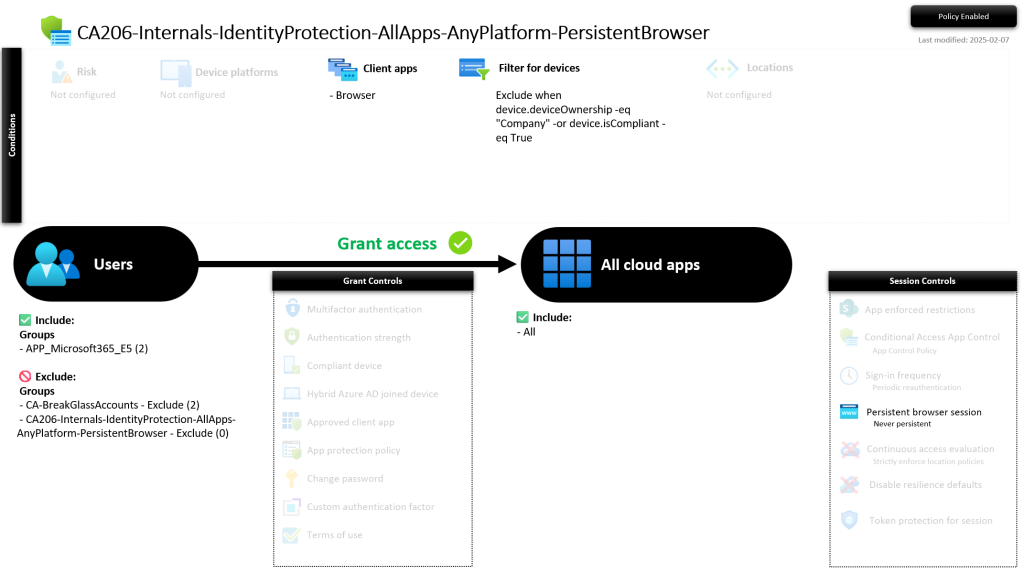
CA206-Internals-IdentityProtection-AllApps-AnyPlatform-PersistentBrowser
This policy prevents having persistent browser sessions for internals from unmanaged devices. Managed and compliant devices are excluded from the policy.
Important: Verify the included group(s) and/or add your custom groups which have all internals in it. APP_Microsoft365_E5 is added as an example.
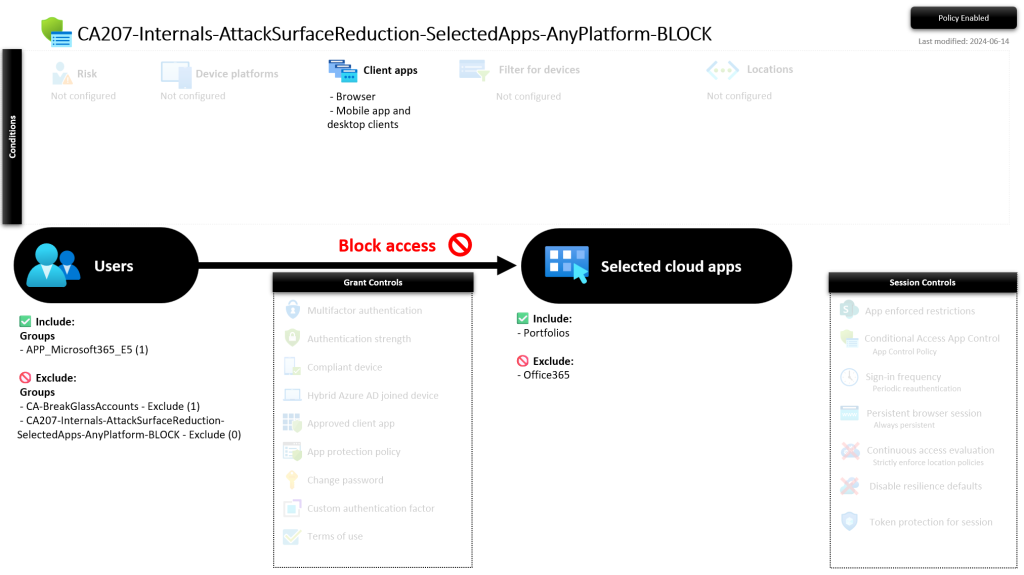
CA207-Internals-AttackSurfaceReduction-SelectedApps-AnyPlatform-BLOCK
This policy prevents internals from accessing specific apps. In this example i’ve blocked a random app. You should review the included and excluded apps. Excluding office 365 is not necessary if its not included. This is just an example.
Important: Verify the included group(s) and/or add your custom groups which have all internals in it. APP_Microsoft365_E5 is added as an example.
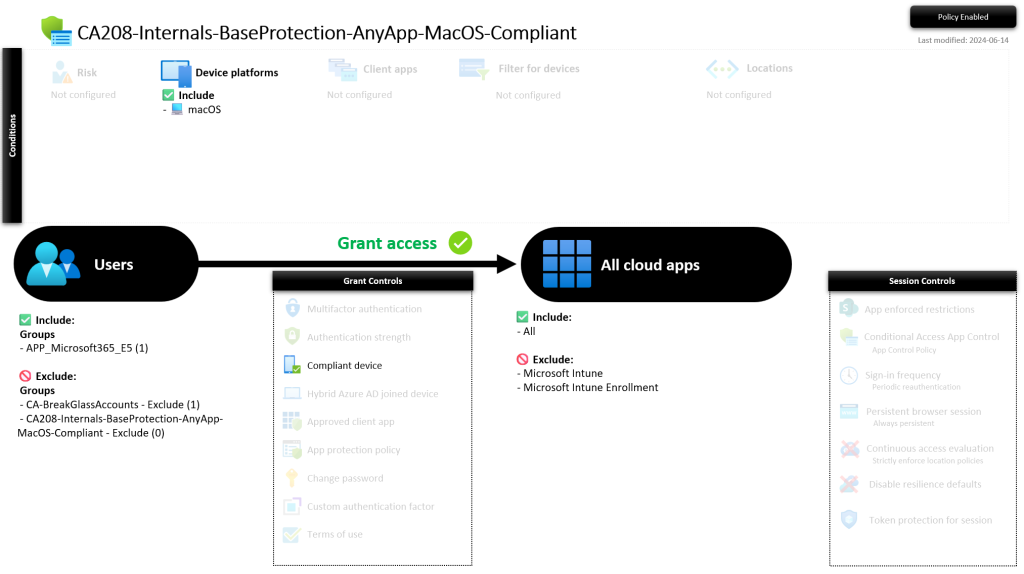
CA208-Internals-BaseProtection-AnyApp-MacOS-Compliant
This policy requires MacOS devices to be compliant for internals.
Important: Verify the included group(s) and/or add your custom groups which have all internals in it. APP_Microsoft365_E5 is added as an example.
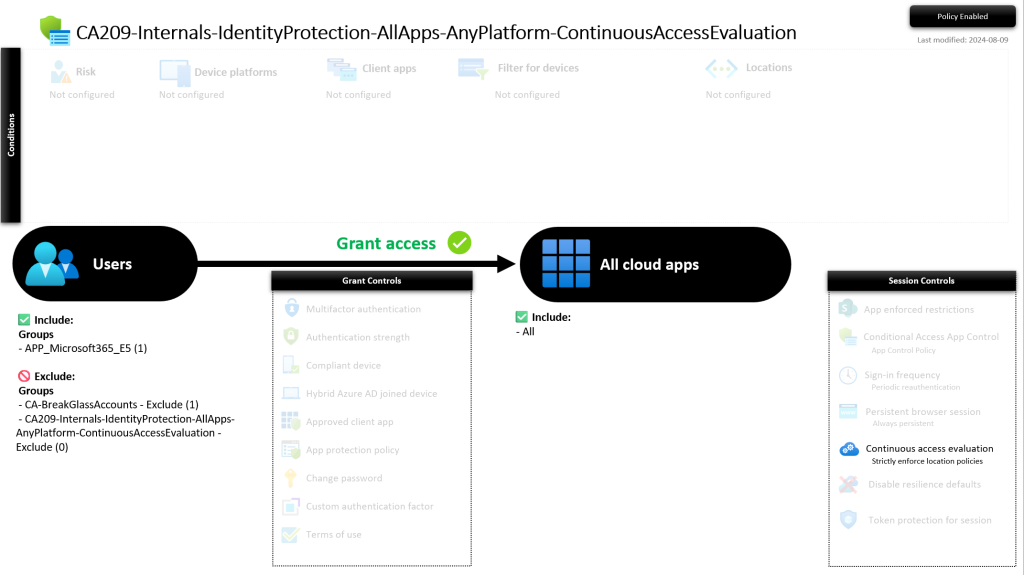
CA209-Internals-IdentityProtection-AllApps-AnyPlatform-ContinuousAccessEvaluation
This policy allows Microsoft Entra ID to re-evaluate a user’s access to resources in near real-time, rather than waiting for the typical token expiration time (which could be up to an hour). Read the Microsoft documentation here.
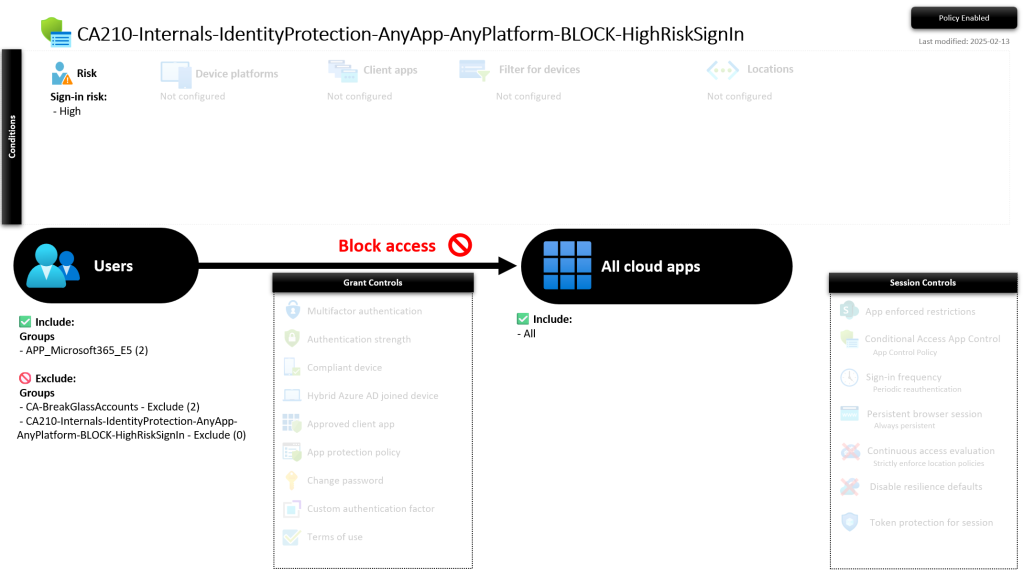
CA210-Internals-IdentityProtection-AnyApp-AnyPlatform-BLOCK-HighRiskSignIn
This policy blocks all internal users which have a high risk (Sign-in risk) status, to all cloud apps, from all platforms.
Important: Verify the included group(s) and/or add your custom groups which have all internals in it. APP_Microsoft365_E5 is added as an example.
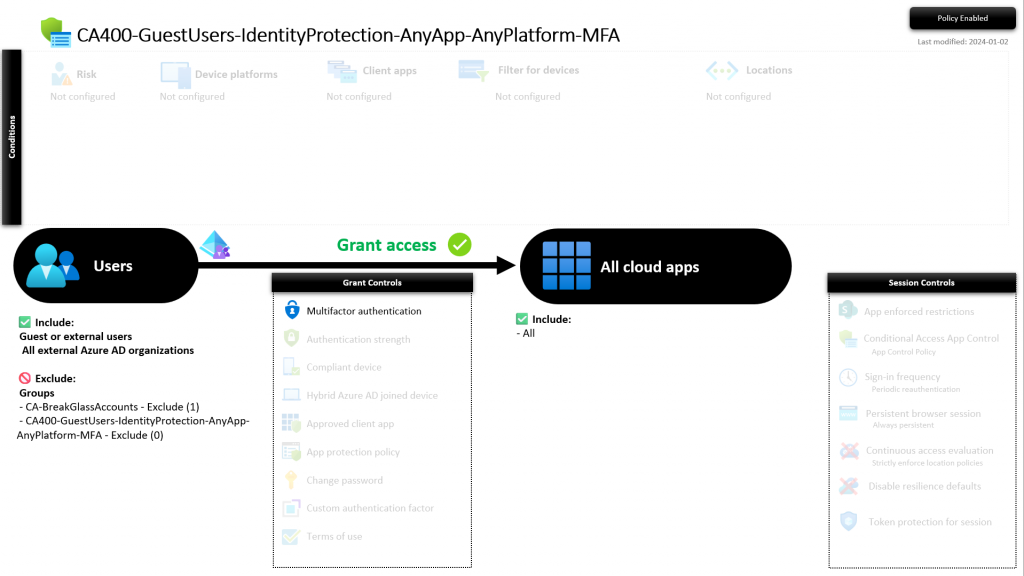
CA400-GuestUsers-IdentityProtection-AnyApp-AnyPlatform-MFA
This policy requires guest to use MFA, from any platform when accessing any cloud app.
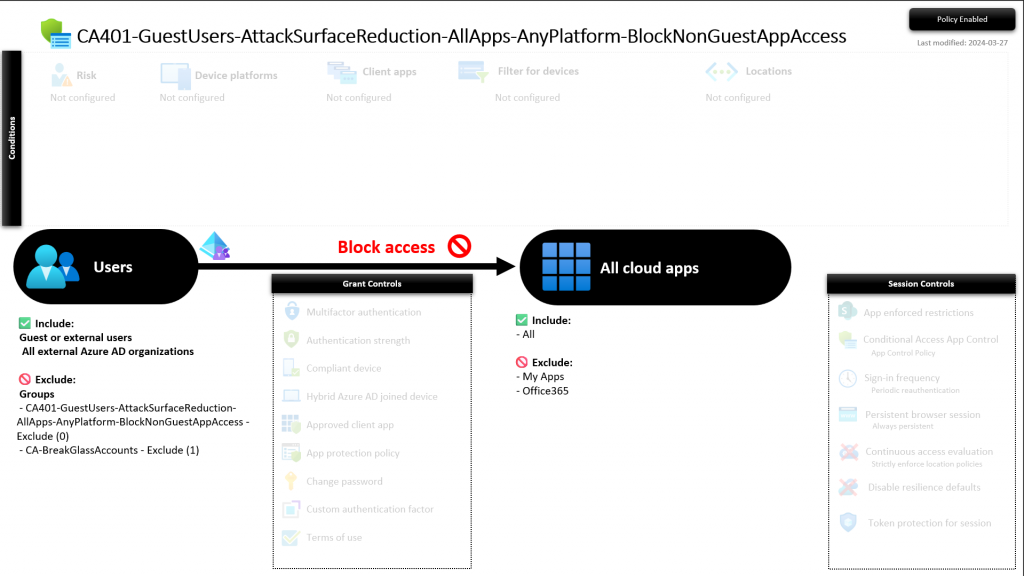
CA401-GuestUsers-AttackSurfaceReduction-AllApps-AnyPlatform-BlockNonGuestAppAccess
This policy blocks access for guests to all cloud apps (except for those excluded), from any device.
Important: Make sure to exclude additional cloud apps if any guest needs access to these apps.
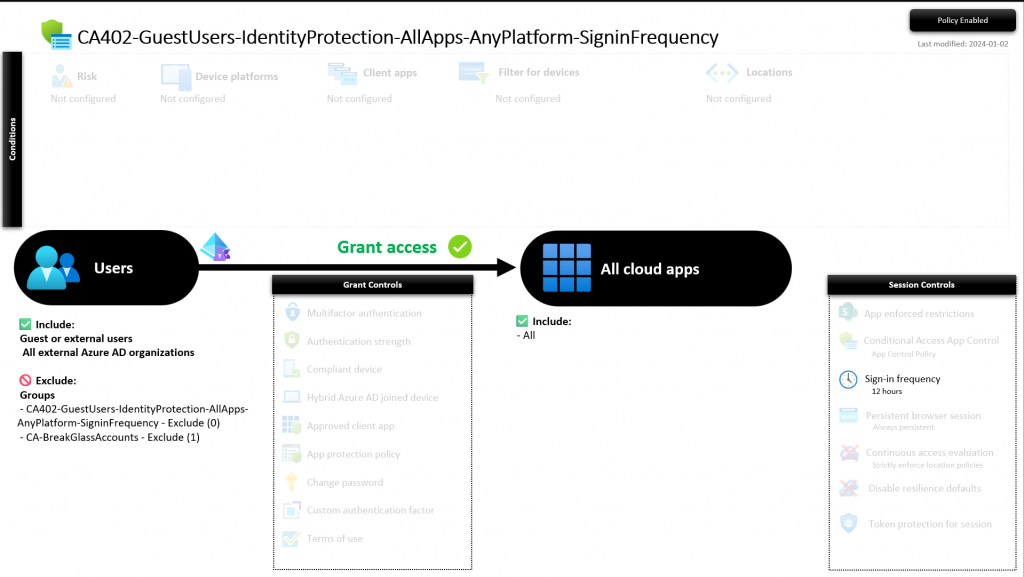
CA402-GuestUsers-IdentityProtection-AllApps-AnyPlatform-SigninFrequency
This policy sets a Sign-in frequency to a maximum of 12 hours for guests, to all cloud apps, using any device.
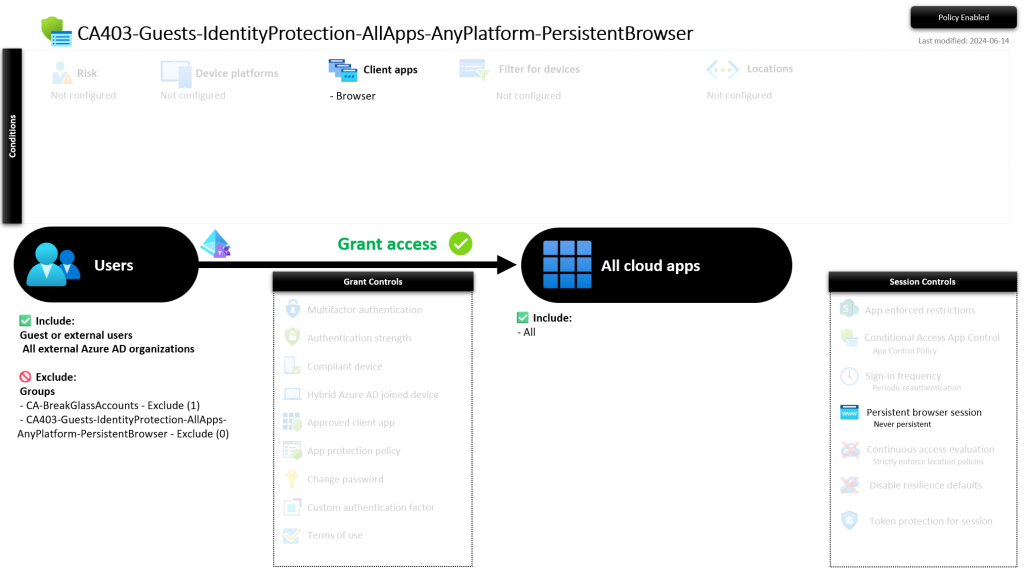
CA403-Guests-IdentityProtection-AllApps-AnyPlatform-PersistentBrowser
This policy prevents guest from having persistent browser sessions.
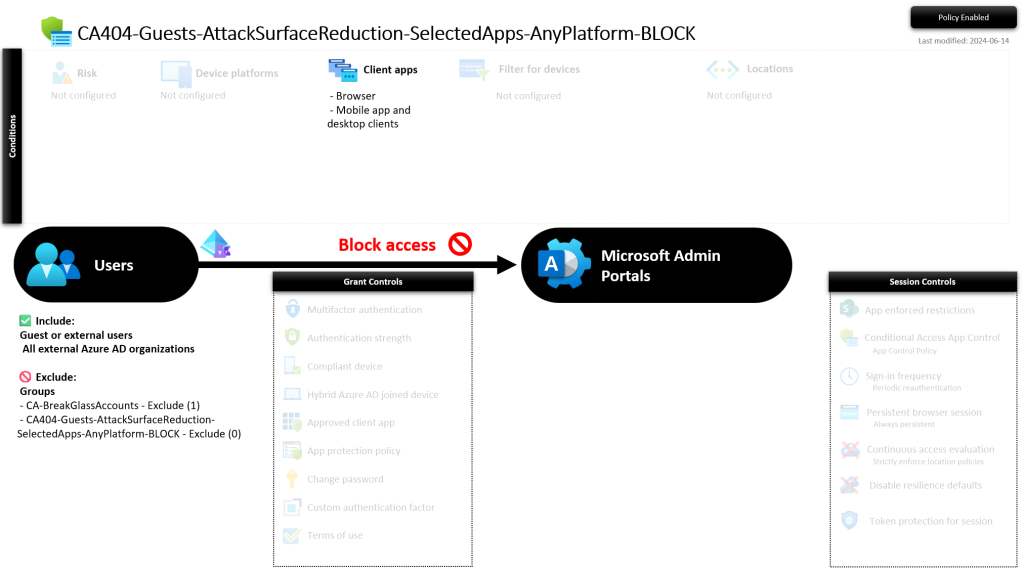
CA404-Guests-AttackSurfaceReduction-SelectedApps-AnyPlatform-BLOCK
This policy prevents guests from accessing specific apps. In this example i’ve blocked a random app. You should review the included and excluded apps. Excluding office 365 is not necessary if its not included. This is just an example.
Caution: Be careful activating the policies! Make sure you have decent exclusions and/or a break the glass account in place. Enable the policies one by one or start with report-only.
Considerations
- You might want to remove the “CA – BreakGlassAccounts – Exclude” group from Admin MFA policies (CA101, CA102) if they use MFA and/or only exclude 1 single BreakGlass account.
Troubleshooting
- If you encounter an error when importing policies CA203/CA205/CA208, it may be due to the absence of the “Microsoft Intune Enrollment” app in your tenant. To resolve this, recreate it using PowerShell with the following commands:
Connect-AzureAD -AccountId admin@organization.onmicrosoft.com New-AzureADServicePrincipal -AppId d4ebce55-015a-49b5-a083-c84d1797ae8c
Resources
Written by Joey Verlinden
Back to all articles